Analytics
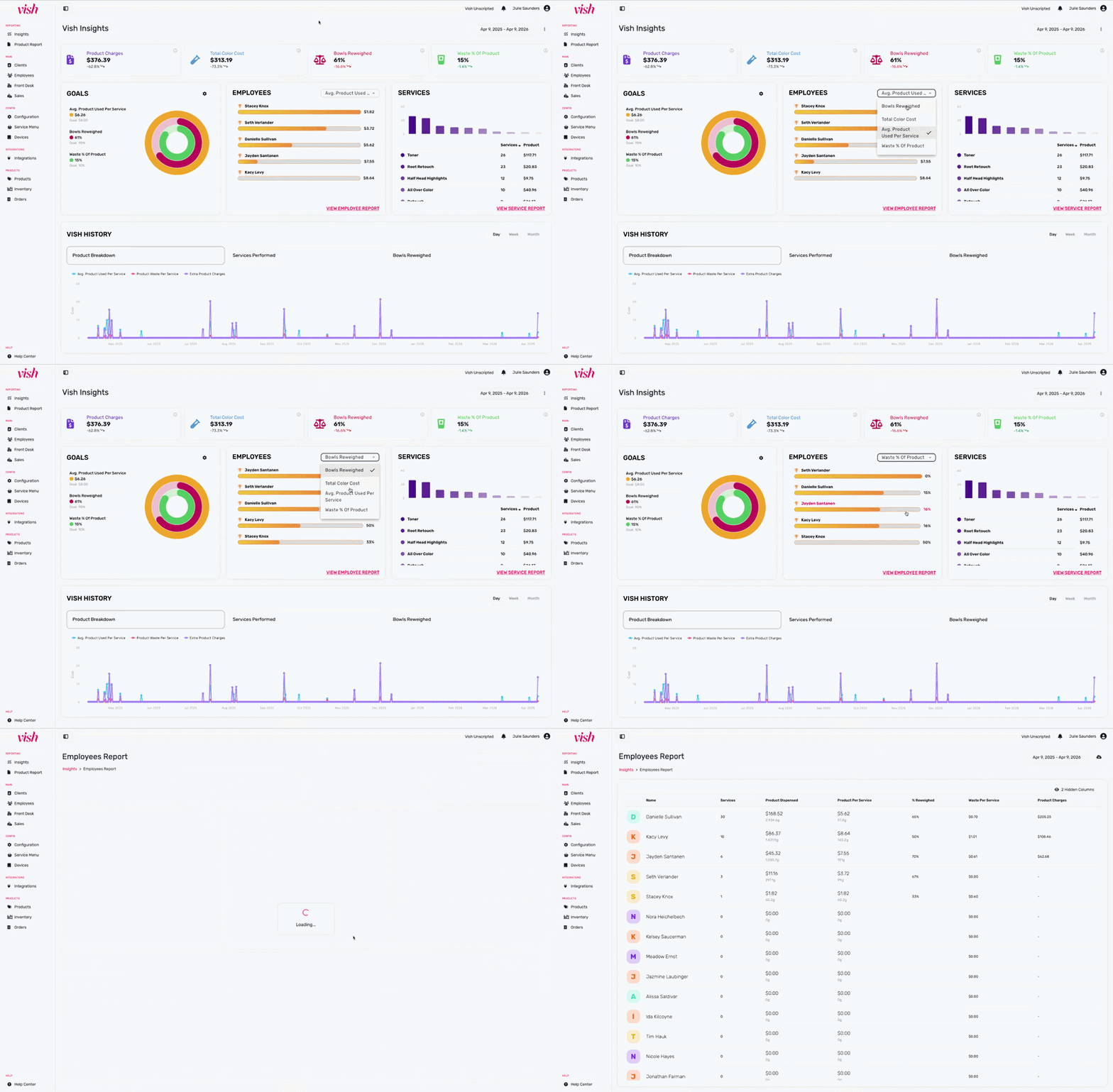
The updated Insights page allows you to dive deeper into your color numbers. You can now pin the metrics that matter most to your salon and set real targets to work toward, so you and your team always know if you're on track, behind, or ahead.
Key Metrics
Pin up to 4 metrics to your main dashboard so the numbers you care about are always front and center.
Available Key Metrics:
- Product Charges: Total amount of extra product charges recommended by Vish.
- Total Color Cost: The wholesale cost of all products dispensed.
- Bowls Reweighed: The percentage of all color bowls that were reweighed after application.
- Engagement: The percentage of eligible services where the color formula was measured and mixed using Vish.
- Estimated Waste: The total cost of wasted product - color mixed but not used, including bowls that were not reweighed.
- Avg. Product Used Per Service: The average wholesale cost of product dispensed for each service.
- Waste % of Product: The percentage of the total product dispensed that is waste (color mixed but not used).
- Actual Waste: Total amount of waste based on your reweighed bowls.
- Total Product Weight: Total weight of product mixed in Vish.
You can hover over the "i" icons in the KPI cards to see specific definitions of how Vish calculates these metrics.
How to set your Key Metrics
- From your main dashboard, click the three-dot menu to the right of the date picker
- Select "Configure Key Metrics"
- Choose up to 4 metrics to pin to your dashboard, then save
- Your dashboard will show live progress against your key metrics from that point forward
Goals
You brought Vish into your salon for a reason, to eliminate color waste and capture forgotten charges. Now, you can track up to 3 specific objectives directly on your home screen.
By default, your dashboard is set to industry gold standards:
- $8.00 Average Product per Service.
- 10% Waste Percentage.
- 90% Reweigh Rate.
Available Goal Metrics:
- Bowls Reweighed: Target reweigh percentage.
- Engagement: Target the percentage of eligible services where color was measured in Vish.
- Avg. Product Used Per Service: Target the average wholesale cost of product per service.
- Waste % of Total Product: Target the percentage of total product that is wasted.
Real-time progress bars show exactly how close you are to hitting your targets for the selected time period.
How to set your Goals
- From your main dashboard, click the gear icon in the Goals section
- Choose up to 3 metrics
- Set your goal percentage or amount per metric, then save
- Your dashboard will show live progress against your goal metrics from that point forward
Tip: Start with bowls reweighed. The industry benchmark is 80% or higher — use the dial to set that as your first target and see where your team lands by end of week.
Employee Leaderboard
Turns data into a leaderboard, allowing you to celebrate top performers and identify coaching opportunities.
- A live ranking of your team, sorted from top performers to those needing the most support.
- Switch the leaderboard view between Bowls Reweighed, Avg. Product per Service, Product Dispensed, or Waste %.
- Click any employee’s name to see their personal metrics and how they compare to the salon average, perfect for 1-on-1 performance reviews.
- Click the button at the bottom to open a full table breakdown of all employees, which can be downloaded for payroll or management meetings. Click View Employee Report for a granular breakdown of individual stylist habits.
Service Breakdown
Connects your most popular bookings to the actual cost of the product used and analyzes which services are driving your product costs.
- See which services are driving the most volume and how much product they consume in total.
- A deep-dive audit of your technical menu. Use this to see if your "Average Product Cost" for a specific service matches the "Product Allowance" in your pricing. If the cost is higher than the allowance, it’s time to adjust your menu pricing.
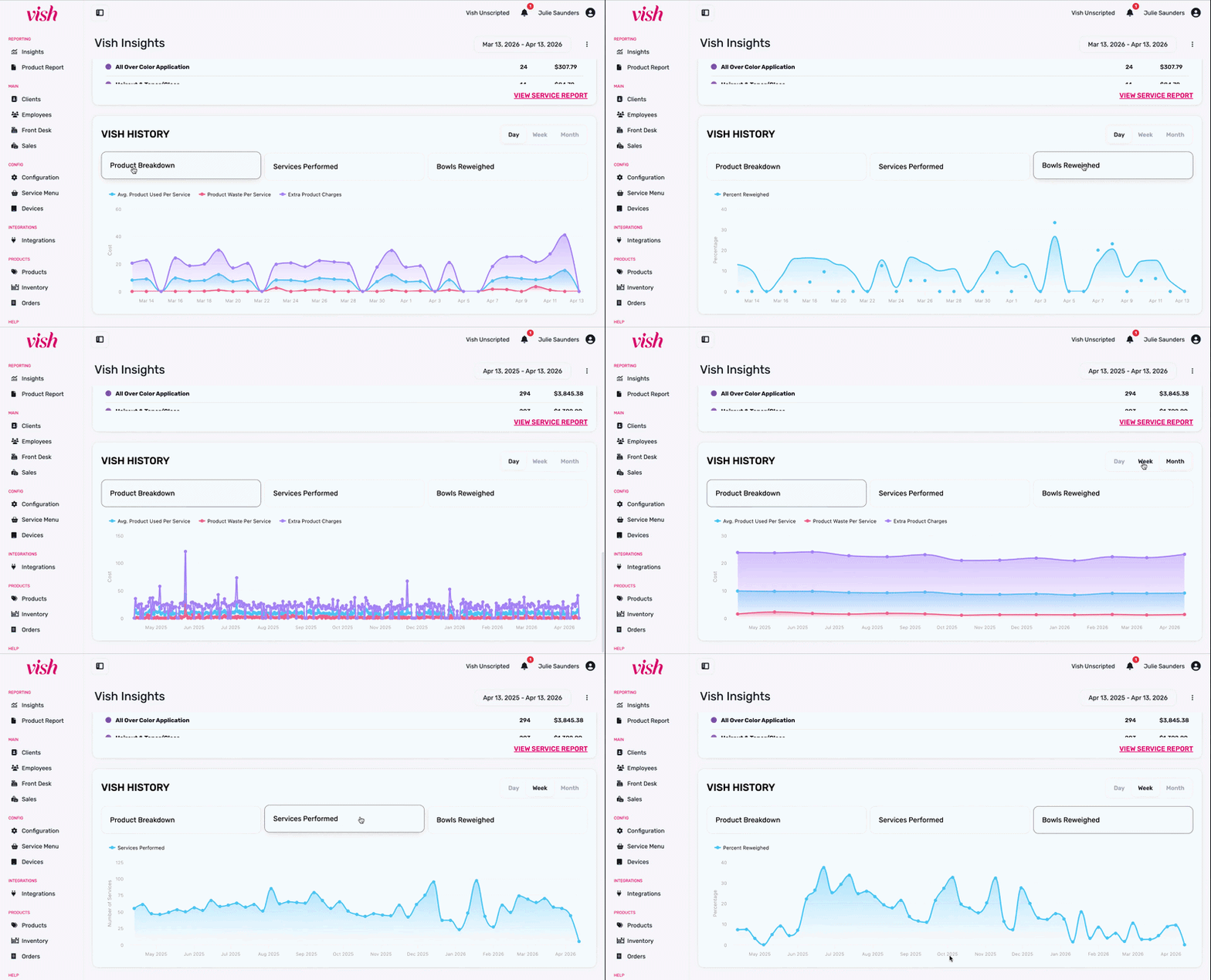
Vish History
The History Graph allows you to zoom out and see the long-term performance of your salon. Use the Legend to toggle specific views:
- Product Breakdown: A combined view of Avg. Product Used, Extra Charges, and Waste.
- Services Performed: Track your salon’s volume and seasonal trends.
- Bowls Reweighed: Monitor the consistency of your team’s habits over time.
- Flexible Timeframes: Change the x-axis to Day, Week, or Month and use the global date picker to see your "Trend of All Time" since joining Vish.